EDIT May 25, 2021: Google Tag Manager's "Server-Side Tagging" is evolving, and bypassing ad blockers is becoming easier and easier. I added the section “One step ahead of ad blockers” to the article.
Google Tag Manager, the Trojan horse for marketing teams
Google Tag Manager is a TMS (Tag Management System): it allows marketing teams to add trackers to a website or app without having to go through developers. Through a web interface, these teams can decide:
- Which trackers to trigger (analytics, A/B testing, attribution, etc.).
- Under what conditions to trigger them (page categories, user characteristics, etc.).
- Which data to send to these third-party tools (user characteristics, browsing data, variables present on the page, etc.).
It is not the only one (other examples include Segment, the French TagCommander and Matomo Tag Manager), but Google Tag Manager is overwhelmingly dominant:
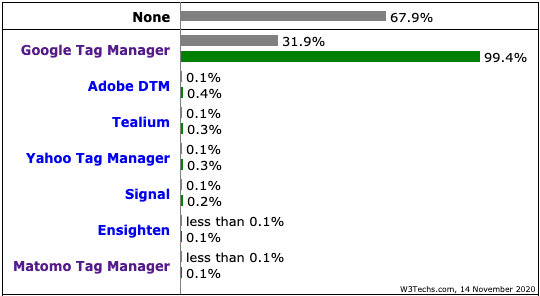
Google Tag Manager is present on 31.9% of the top 10 million Alexa websites, according to W3Techs, but above all Google Tag Manager has a 99.4% market share among TMSs (!)
How did Google manage to dominate once again? Just like with Google Analytics, the standard version of Google Tag Manager is free (competing solutions are generally paid), it is very well integrated with other Google products, and it is well made.
Trackers that are no longer called from your browser
Last August, Google announced a new version of Google Tag Manager, called Server-Side Tagging. Here is a Google diagram explaining how Google Tag Manager works in the Client-Side Tagging version (the original version):
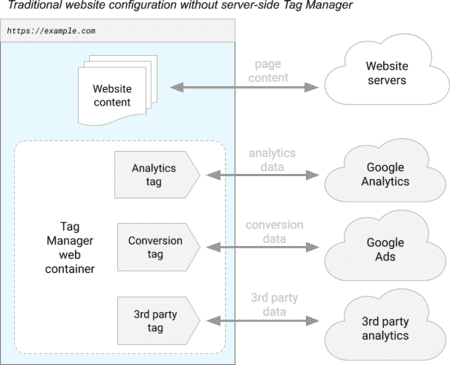
Google Tag Manager allows various third-party trackers to be triggered (in the diagram: Google Analytics, Google Ads, and an analytics tool), directly in your browser.
In the new Server-Side version, third-party trackers are no longer run from your browser but from a "proxy" server, called a "Server container" in the diagram below (and hosted by Google):
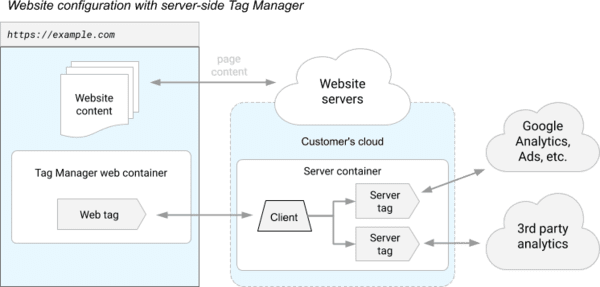
The JavaScript library (called "Tag Manager web container" in the diagram) still runs in your browser in order to collect your interactions and personal data, but the various third-party trackers are executed on the server side.
Note that this new version also applies to apps and to the collection of “offline” data (to transmit in-store purchases, for example):
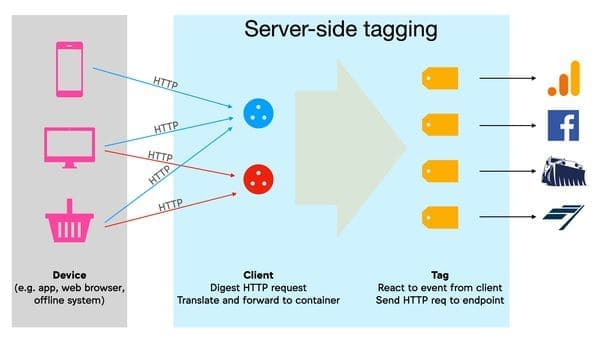
Diagram from Simo Ahava's blog: on the server side, "Clients" translate incoming HTTP requests into "events"; "Tags" react to these events to send "hits" to third-party marketing companies.
This logic of triggering third-party trackers server-side changes the game. Simo Ahava detailed the different impacts in an excellent article. I will summarize the advantages and focus on the privacy problems (operating server-side can make it possible to bypass your choices and leak your personal data without being exposed).
Better user experience
On most websites, the number of JavaScript libraries loaded by third parties (for analytics, advertising, A/B testing, etc.) is impressive. Loading and executing these libraries is often the main cause of a poor user experience: slow pages and lack of interactivity.
The consequences for websites that offer a poor user experience: less satisfied users, who will leave the site outright or not come back.
Here is an example with Le Bon Coin, which calls an uncountable number of JavaScript libraries:
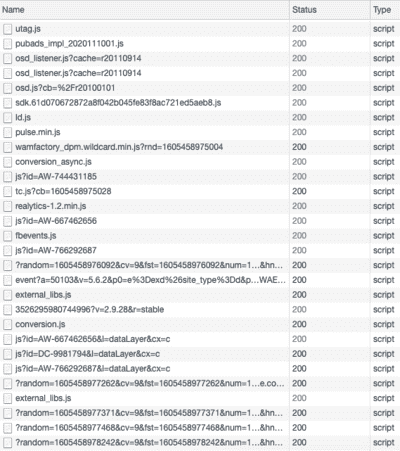
A small sample of the JavaScript scripts called on the Le Bon Coin home page, which leaks your personal data to many third parties.
In the best-case scenario, the website will install only one JavaScript library (because events can vary greatly between tools with different goals, the website may sometimes use more than one library). This could be Google Tag Manager's library, but not necessarily: it is possible to create your own library or use other libraries on the market such as Snowplow, Matomo, AT Internet, etc.
This library is then responsible for sending the “hits” with the required parameters during key interactions. The "client" in the server container then has to translate these "hits" into events; these events are read by the "Tags", which send "hits" to third-party marketing companies. Note that if the JavaScript library installed on the site is provided by Google, the "client" is already pre-configured in Google Tag Manager. If the website uses another library, it will need to create its own "client" in Google Tag Manager (example with AT Internet), while waiting for pre-configured “clients” for the main JavaScript tracking libraries.
The advantage, then: a single JavaScript tracking library is installed on the website, with a single data “flow” from the browser. The user should notice the difference.
Better control over data transmitted to third parties
Having a server-side "proxy" allows you to control the data transmitted to third parties (which is much more difficult when the trackers are directly executed by the user's browser):
- By default, and unlike the "client-side" version, the user's IP address and User-Agent (browser name, version, operating system, language, etc.) are not leaked (which avoids identifying the user via "fingerprinting"). The publisher using the Server-Side Tagging version of Google Tag Manager can decide to send this information to third parties, but this is not automatic.
- Personal information often leaks to third parties via URL parameters (see for example the article "Google Tag Manager Server-Side — How To Manage Custom Vendor Tags"); Server-Side Tagging helps prevent this.
- Generally speaking, the publisher controls the personal data and cookies sent by its "proxy" to third parties (read Google's technical documentation; note, for example, the get_cookies and set_cookies methods). It can therefore “clean” the information and send only what is strictly necessary to third parties.
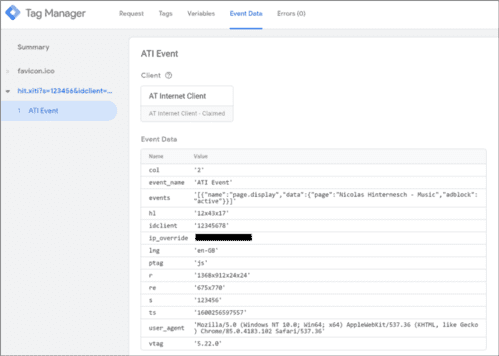
Example of an AT Internet hit "seen" by the "proxy" server: the website can decide not to transmit the user's IP address and User-Agent to AT Internet.
A more secure website
Setting up a Content-Security Policy (CSP) allows a publisher to better protect itself against different types of threats, including XSS (Cross-Site Scripting) attacks and content injections. By adding a header to web server responses, the site can tell browsers which resources (scripts, CSS, etc.) are allowed.
Here is an example of a CSP documented by Google:
Content-Security-Policy: script-src 'self' https://apis.google.com.
Which means: the browser is only allowed to execute scripts that come directly from the site being visited ('self') or from apis.google.com. And here is how your browser will react if a malicious script then tries to run from the site being visited:
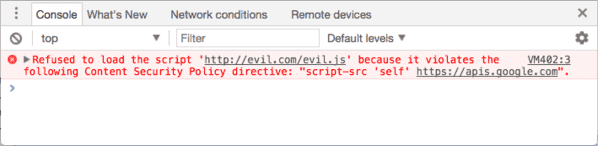
The evil.js script is not hosted on the site being visited, nor on apis.google.com: its execution is blocked by the browser.
By sharply reducing the number of third-party domains authorized to execute JavaScript code, the CSP becomes more robust.
If Server-Side Tagging has advantages for users who consent to marketing surveillance (speed, security), it puts the protections of non-consenting users at risk.
Bypassing browser protections
The "proxy" server is hosted in the Google cloud (App Engine instance), but Google recommends linking the App Engine domain to a subdomain of its clients' site (without explaining why):
The default server-side tagging deployment is hosted on an App Engine domain. We recommend that you modify the deployment to use a subdomain of your website instead.
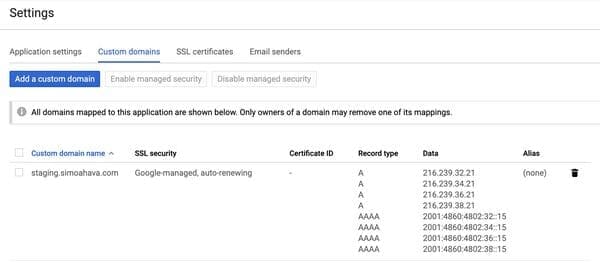
The link between the App Engine domain and the client subdomain, documented by Google.
Google does not recommend a CNAME (alias) DNS record, but an A or AAAA DNS record, directly linked to Google App Engine IP addresses, with Google acting as host. The “proxy” server is therefore treated by browsers as first party, and the consequences are significant.
In particular, cookies set by the “proxy” server are not third-party cookies, nor cookies created via JavaScript, nor cookies set by a CNAME domain. They are therefore allowed without restriction:
- Safari, via Intelligent Tracking Prevention (ITP), restricts the lifespan of cookies created in JavaScript to 7 days (for example: first-party cookies created by Google Analytics). Thanks to the “proxy” server, third-party trackers can now bypass this limitation.
- Still via ITP, Safari now restricts cookies set via a CNAME domain to 7 days. Thanks to the “proxy” server, third-party trackers are not affected by this limitation.
- Brave, for its part, blocks CNAME requests to known trackers. Again thanks to the “proxy” server, third-party trackers avoid this blocking.
Bypassing ad blockers
Your ad blocker (uBlock Origin on Firefox, for example), your content blocker (Firefox Focus or AdGuard on iOS, for example) or your DNS blocker (NextDNS, for example) runs on your device. It can therefore detect third-party trackers and block them before your personal data leaks.
None of this applies with the Server-Side Tagging version of Google Tag Manager: personal data leaks happen from the client's proxy server (hosted in the Google cloud) to third parties. You therefore no longer have control to prevent these leaks.
You might think: just block the first call, the one from your browser to the JavaScript library responsible for collecting the data and communicating with the "proxy" server. Except that this JavaScript library can very well be served from the website's own domain (and not from a Google domain, for example). Google also already recommends that its clients change their gtag.js scripts to use the proxy server's domain. This change already makes domain-name blocking ineffective.
All Google tracking libraries (gtag.js, analytics.js, but also gtm.js, Google's "advanced" library responsible for Google Tag Manager) can be hosted on the site's own domain.
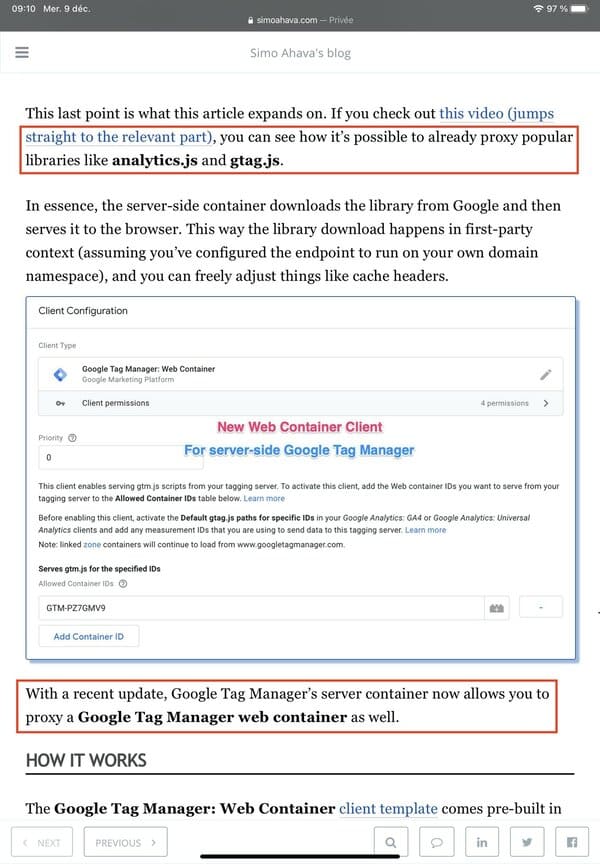
Via Simo Ahava's blog.
If gtag.js or gtm.js are JavaScript libraries whose names are known to the main ad blockers, those blockers will have to find other methods when the JavaScript library has been renamed or when sites have created their own libraries.

uBlock Origin, effective against CNAME cloaking on Firefox, powerless against Server-Side Tagging?
One step ahead of ad blockers
The Google Tag Manager JavaScript library is called gtm.js, and it is called with the container identifier: GTM-.... An ad blocker can therefore easily target these names and block the loading of this library. A website could decide to create its own JavaScript library, but that is not so easy.
But once again thanks to Simo Ahava, it is now easy to choose another name for the gtm.js JavaScript library and hide the container identifier (no need to create your own JavaScript library):
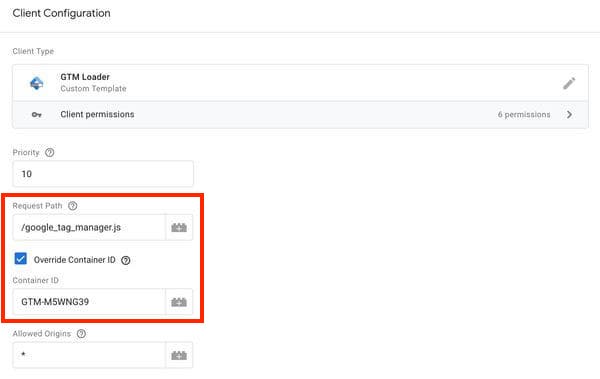
Via Simo Ahava’s blog: with Simo's "GTM Loader" template, the website can rename the JavaScript library ("Request Path") and hide the container identifier ("Override Container ID" checked, "Container ID" empty).
Also, even if ad blockers could target Google's proxy, a website can now host the server container elsewhere (on Amazon AWS, Microsoft Azure, OVH... or on its own infrastructure). It is not that easy, but Google provides the Docker image and the steps to follow.
Simo Ahava thus explains how to deploy the server container on Amazon AWS, while Mark Edmondson details how to deploy the server container on Google Cloud Run (another Google Cloud Platform service, different from Google App Engine).
How can ad blockers react?
The subject is not straightforward. Here are some ideas, but I am not sure they are feasible:
- Automatically detect these "first-party" calls to the "proxy" server via the URL parameters sent. Except that these URL parameters will change from one site to another, depending on the library used, the page viewed, etc.
- Detect the JavaScript library responsible for calls to the “proxy” server in order to block its execution. As we have seen, this method will not work if the website renames the Google Tag Manager library or develops its own JavaScript library.
- Block proxies, at the risk of blocking essential website features? Also, this method does not work if the website decides to host the server container on its own infrastructure.
- Never run JavaScript in your browser, for example with the NoScript extension set up aggressively. An effective option, except that many websites will no longer work.
Leaking your personal data in total opacity
Although many websites today leak your personal data, often without your consent, it is nevertheless possible to audit the sites, prove the consent violation, and document the leaks. The CNIL could, for example, do its job and sanction wrongdoing. None of this applies with Server-Side Tagging. A site can now very easily:
- Give the appearance of consent by letting you respond to a consent banner.
- While leaking your personal data to multiple third parties, without an external auditor being able to notice it (they will simply see the "first-party" call to the "proxy" server, without knowing whether the personal data is used, shared, or resold behind the scenes).
Your data on the Google cloud
By default, the "proxy" server logs all requests it receives:
By default, App Engine logs information about every single request (e.g. request path, query parameters, etc) that it receives.
But the personal data contained in these requests is not the only information leaking to Google. Just as with CNAME cloaking, cookies associated with the domain of the site being visited are sent to the subdomain of the “proxy” server. So, if your session cookies are associated with the site domain (and not with a separate subdomain), they will indeed be sent to the Google cloud.
Google states that data hosted on its cloud belongs to the customer, not to Google. However, you still have to trust Google.
Server-Side Tagging, probably soon widely adopted
Server-side solutions had existed on the market for a long time, and it was already possible to develop your own "proxy", but the launch of Google's solution will probably have a huge impact on the adoption of Server-Side Tagging:
- Google Tag Manager is present on a considerable number of websites, it is ultra-dominant.
- Google presents this version as an evolution of TMS tools, improving website performance and security.
- A big argument for marketers: leaking your personal data to Facebook.
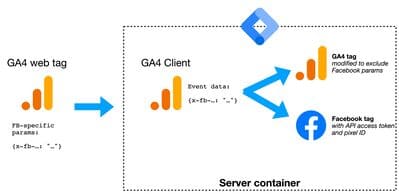
A Google Analytics tag can hide the leak of your personal data to Facebook — combo!
Even if a Google Tag Manager client can continue to use the Client-Side version, even if the Server-Side version still has limits (few third-party libraries, some solutions will be difficult to support, etc.), even if learning the solution is complex, and even if it is often paid (Google App Engine billing for the "proxy" server), we can therefore bet that Google Tag Manager clients will gradually migrate to this version.
Bypassing ad blockers and other browser protections as a selling point
As we have seen, Google doesn't explain the reason for creating a subdomain of the website for its “proxy” server:
The default server-side tagging deployment is hosted on an App Engine domain. We recommend that you modify the deployment to use a subdomain of your website instead.
There is no need for it: bypassing browser protections and ad blockers has already been listed as a "benefit" by many publications:
- "Server-side Tagging In Google Tag Manager" by Simo Ahava: the article mentions the benefit of bypassing Safari's limitations on the lifespan of JavaScript cookies. To his credit, the author does not want to give details on the fact that Server-Side Tagging makes it possible to bypass ad blockers, and says that data must be collected after consent has been obtained.
- "GTM Server Side – The natural evolution for your tagging?" from Converteo. The article lists as advantages the ability to bypass browser limitations such as those of Safari and Firefox, as well as bypassing ad blockers.
- "Introduction to Google Tag Manager Server-side Tagging", from the Analytics Mania blog. Here too, bypassing browser and ad blocker limitations is listed as a benefit.
- "Google introduces server-side tagging, good news?" by Nicolas Jaimes on the JDN. The angle of the article is advertising, and therefore bypassing browser protections is listed as a benefit (even if, for the moment, the lack of third-party libraries means that Server-Side Tagging remains complex to implement).
Unfortunately, it is a safe bet that many sites will also be attracted by these "benefits", in addition to the gains in performance, security, and control. The inability to audit websites will also be a big loss for privacy advocates. Let us hope that browsers and ad blockers find ways to respond, so that internet users concerned about their privacy can continue to defend themselves.