During my analyses of sites and apps, the conclusion is often the same: in the absence of real sanctions against publishers, you have to protect yourself from advertising surveillance through technical means. This article aims to share my current setup.
The choice of tracker and ad blockers is obviously very personal: you probably use other apps, other extensions, and your choices may be more effective. Also, I am far from the only person writing on the subject and I am not an "ad blocking" expert, so don't hesitate to share your experience!
Depending on the device, it is more or less easy to block trackers and ads. Here are the different scenarios I face.
Block trackers and ads in a desktop browser: ad blockers are now widely adopted
On my MacBooks (personal and professional), when I browse the web, I use Firefox with the uBlock Origin extension. On Firefox, this ad blocker detects "CNAME cloaking" and blocks it (which is not the case on Chrome). "CNAME cloaking" is a technique that some surveillance marketing players use to track you even after you have taken precautions (it also raises security concerns). If you want to explore the subject further, read NextDNS's explanation (in English) and La Quadrature du Net's presentation (in French).
Above all, unlike Adblock Plus, which I strongly advise against, uBlock Origin does not give advertisers any privileges. Eyeo, the company behind Adblock Plus, created the Acceptable Ads program, and is paid large sums by surveillance marketing giants such as Google, Microsoft, Amazon, Taboola, Outbrain and Criteo not to block their ads by default: a huge hypocrisy!
It's easy for me to recommend Firefox and uBlock Origin to my friends and family:
- Firefox is easy to install and very fast. It is open-source software developed by an independent player (Mozilla) that respects its users' privacy.
- uBlock Origin is also simple to install, and very efficient.
Block trackers and ads on the web, on an iPhone: content blockers are less widely adopted
On my iPhone, when I browse the web, I use Safari. Thanks to Intelligent Tracking Prevention (ITP), it protects me against cross-site tracking by third parties (in particular by blocking third-party cookies, though not only that). Note that since iOS 14, Intelligent Tracking Prevention also applies to other browsers: Chrome on iOS also protects you against third-party cross-site tracking! That said, ITP does not meet all my needs:
- It does not block ads.
- It blocks cross-site tracking but does not block the trackers from firing (Safari keeps sending requests to numerous marketing companies).
- It allows tracking when it is limited to a single site: a publisher's analytics tool (Google Analytics when the publisher has not activated advertising features, AT Internet, Adobe Analytics, etc.) will keep working correctly and tracking your browsing (even if that tracking is restricted to the site you are visiting).
Unlike Android (for example: Firefox for Android), iOS does not allow a browser to install extensions (the browser must use Safari's rendering engine, WebKit): it is therefore impossible to install an ad blocker directly.
You can, however, install a "content blocker", which works only in Safari (not in other browsers) and can block lists of trackers and ads. I therefore use the Firefox Focus content blocker to block ads. AdGuard also offers a content blocker for Safari, but when I used it, it prevented some sites from loading, forcing me to disable it.
It is also easy for me to recommend this option to my loved ones who are on iOS (for Android, I recommend Firefox with uBlock Origin):
- Safari is the default browser, nothing to configure.
- Firefox Focus requires minimal configuration, but it's still fast.
Block trackers and ads in native apps: the public is poorly informed, NextDNS to the rescue
Things get trickier with iPhone apps, where I lacked a good option to block trackers and ads. I paid for ProtonVPN, but it cannot run at the same time as a blocker such as NextDNS or AdGuard.
I also had major battery problems with the ProtonVPN, NextDNS and AdGuard apps, and I thought I knew why: these apps were all VPN-based (they could sometimes use up to 50% of my old iPhone's battery in a day). Before the release of iOS 14, NextDNS and AdGuard had to use a local VPN to encrypt DNS queries.
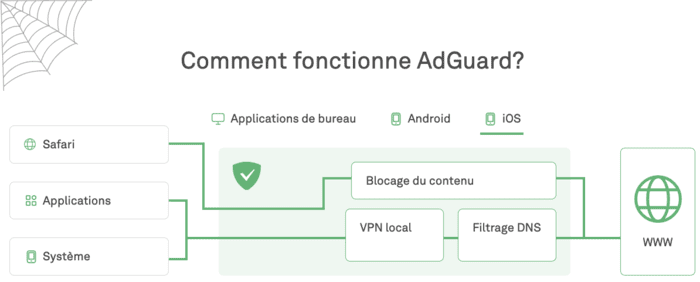
AdGuard uses a local VPN on iOS
But with iOS 14, Apple added the ability to encrypt DNS queries natively. No need to go through the “hack” of a local VPN, and therefore no impact on my battery anymore. Since NextDNS implemented this option quickly, I decided to use it systematically, and I was not disappointed.
With NextDNS, I can:
- Block trackers and ads when I use apps on my iPhone, via the NextDNS iOS app.
- Block trackers and ads on my Apple TV (tvOS also allows DNS requests to be encrypted natively), via the Apple configuration profile generator.
- Block trackers and ads in apps when I use my Mac. One example: the Mac Spotify player is very talkative, it leaks your personal data to Google and Comscore, and uBlock Origin will not help. The NextDNS Mac app blocks these trackers.
- Add a second layer of NextDNS blocking on top of what uBlock Origin already blocks on Firefox (Mac) and Firefox Focus on Safari (iPhone). This has made many consent banners disappear, which makes my browsing more pleasant.
- Configure my Freebox to use NextDNS as its DNS and thus block the trackers of connected devices (my thermostat, in this case).
I can also easily recommend this solution to my loved ones:
- NextDNS is quick to install and configure (unlike a Pi-Hole, which is mainly aimed at tinkerers).
- NextDNS also works on the move (again unlike a Pi-Hole, which will only work on your home Wi-Fi).
Why a DNS resolver is useful
NextDNS is one DNS resolver (Domain Name System) among others. DNS is one of the essential services of the internet: it matches a domain name (example: google.fr) with an IP address (example: 216.58.204.99). By default, you use your internet service provider's DNS server. There is a catch, though:
- These DNS requests are not encrypted, so a hacker can intercept them, learn which sites you are visiting or even modify these requests on the fly to make you download a virus, for example.
- For legal reasons, Internet Service Providers (ISPs) also block access to certain websites. Example: you want to download torrent files (films, series, music) via the site The Pirate Bay, but this may be blocked by your provider. ISPs apply this blocking via the DNS resolver that they make available to you.
To encrypt your DNS queries and allow you to access certain websites, you can change DNS providers. If you do not want to block trackers and ads, OpenDNS is a trusted resolver. If you simply want to use a fast service and are not worried about Google's omnipresence in your life, you can use Google Public DNS. Likewise, if you are not too concerned about the gradual centralization of the web and simply want performance, you can use Cloudflare DNS.
But it would be a shame to stop there! For trackers and ads, the DNS resolver can return an empty response instead of the correct IP address. Example: if you are playing a game on your iPhone and it wants to serve an ad, it will ask your DNS resolver for the address of doubleclick.net (Google's advertising network). If you use NextDNS and have enabled blockers, it will not return a response: you will not be tracked and you will not see the ad!
NextDNS lets you choose your blocklists
As with a “classic” ad blocker such as uBlock Origin, NextDNS lets you subscribe to blocklists:
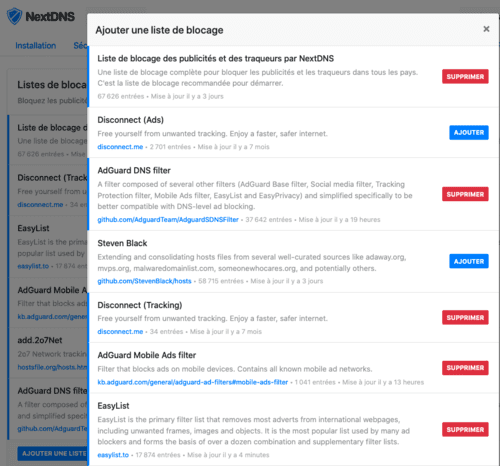
My picks among the most popular lists.
NextDNS also offers blocklists to protect against “native” tracking:
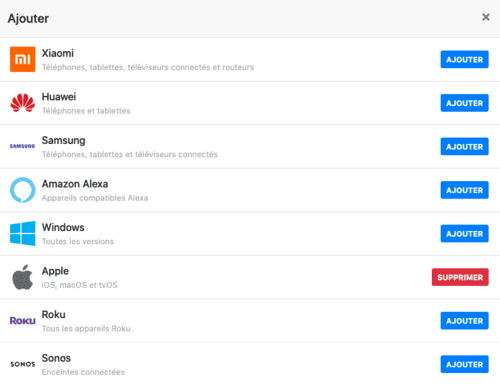
Apple collects usage statistics? I can now block these requests.
NextDNS works transparently
If you decide to enable NextDNS logs, you have a lot of flexibility:
- Retention period: from 1 hour to 2 years. If you just want to check that NextDNS is working properly and fine-tune which domains are blocked, 1 hour is enough.
- Storage location: notably in the European Union or, better, in Switzerland.
You will then be able to “verify” the work of NextDNS via a online interface. Here is the view when I open the L’Équipe app on my iPhone:
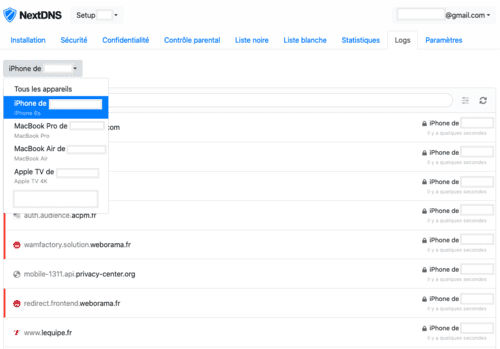
As we have already seen, the L’Équipe app leaks your personal data. But NextDNS prevents these leaks (to ACPM and Weborama in the screenshot), and you will no longer see ads.
If you ever spot unblocked trackers, you can either subscribe to new blocklists or simply add those trackers to your blacklist:
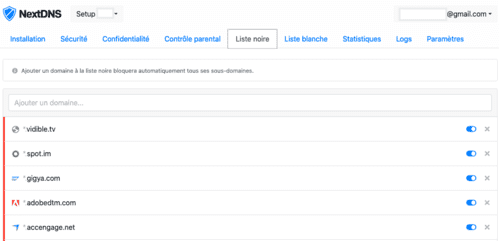
Some trackers added manually
If your logs are activated, you will also have access to aggregated statistics:
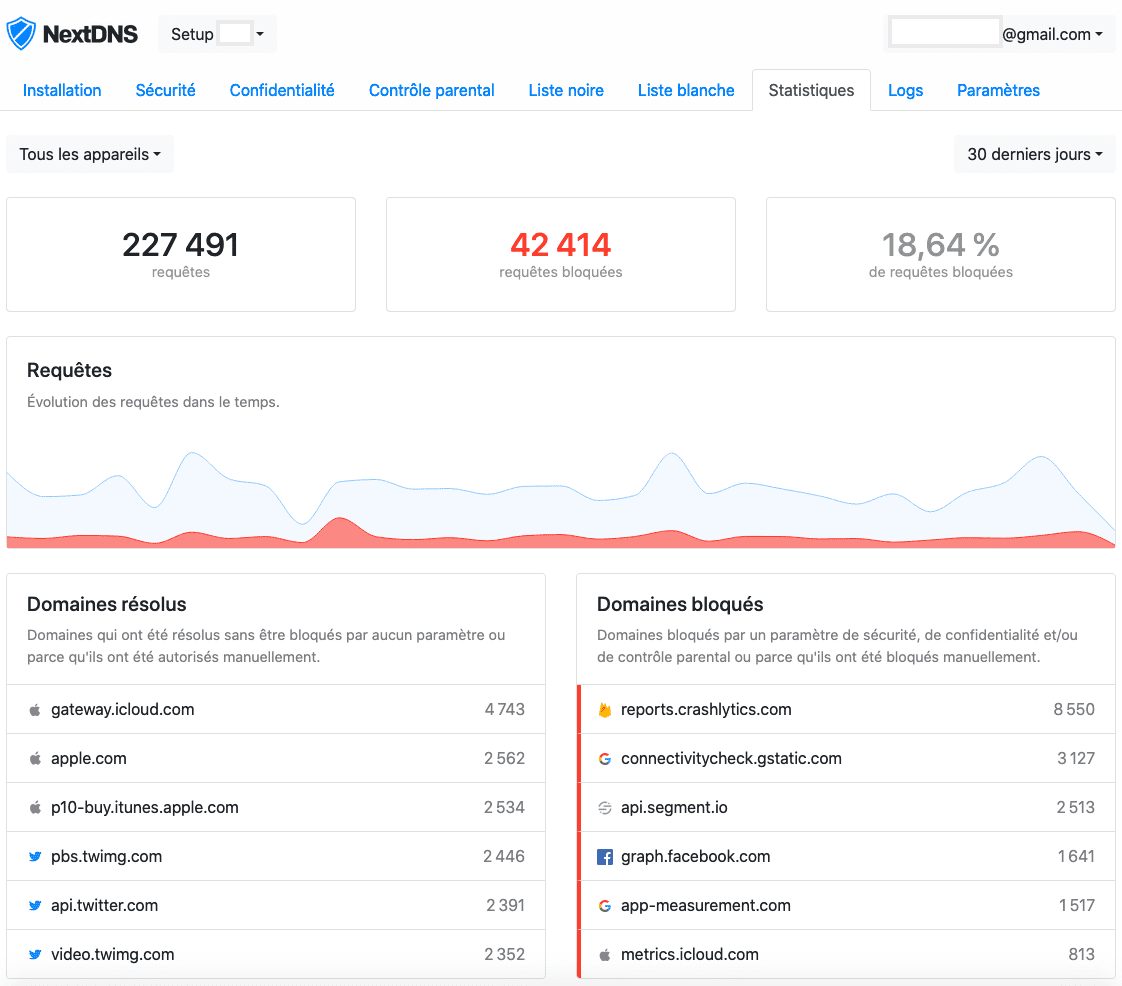
NextDNS blocks almost 20% of my queries. If I look at the per-device view, NextDNS blocks up to 30% of queries on my iPhone and Apple TV (apps are not covered by other ad blockers there). By contrast, on my MacBooks, NextDNS only blocks 3% of requests, because uBlock Origin already blocks trackers and other ads on the web.
NextDNS also blocks “CNAME cloaking”
"CNAME cloaking" is an insidious way to track you while bypassing browser protections and other ad blockers. Its implementation is often accompanied by a serious security vulnerability: the leak of your login credentials to the third party. Here are some detailed examples on this blog:
- LeBonCoin uses it in partnership with Criteo.
- Lemonde.fr uses it in partnership with AT Internet.
- Boursorama used it in partnership with AT Internet and Smart AdServer (the problem has since been corrected).
- Criteo pushes this technique aggressively to its customers, more than 10,000 publishers have already implemented "CNAME cloaking" with Criteo.
Criteo in particular is very vicious in its use of "CNAME cloaking": the "feature" is only enabled if you use Safari (in order to bypass "Intelligent Tracking Prevention"). So you might believe that a site is not going through "CNAME cloaking" if you observe the requests with Firefox or Chrome. So, when you use Safari on iPhone, you are not protected against this surveillance technique.
NextDNS implemented tracking protection via “CNAME cloaking” a year ago already:

Protection is enabled by default.
What is NextDNS's business model?
Before using such a service, the first question is to fully understand the business model. For example, Google's business model is surveillance marketing. If you are worried about Google's omnipresence in our lives, you will probably avoid Google Public DNS. NextDNS has a “freemium” model:
- The service is free for up to 300,000 DNS requests per month (note: for my first month of use, despite intensive use, I did not reach this limit). If you reach the limit and don't pay, NextDNS will behave like a simple DNS resolver for additional queries: no filters, no logs.
- If you exceed the quotas, the price is very reasonable: $1.99/month or $19.90/year (roughly the equivalent in euros).
- NextDNS also offers paid plans for businesses and schools.
Can you trust NextDNS?
If you haven't changed your DNS settings, you are probably using your Internet Service Provider's resolver. When you go through NextDNS, you have to trust a new third party. How do you judge whether that third party is trustworthy? It is up to each person to form their own opinion; here are the arguments that convinced me.
The presentation of the founders, two Frenchmen, sets out NextDNS's principles:
NextDNS has been founded in May 2019 in Delaware, USA by two French founders Romain Cointepas and Olivier Poitrey. Olivier has been working on Internet infrastructures for the last 20 years. In 2005, he founded Dailymotion, the largest video sharing service after Youtube and the most popular European website in the world at the time. He is currently Director of Engineering at Netflix, working on Open Connect, Netflix's home CDN also known as the CDN moving about 30% of the total US Internet traffic. Romain and Olivier closely worked for years at Dailymotion on many different projects. Romain ended up leading the mobile & TV department.
We are true supporters of net neutrality and Internet privacy. We believe that un-encrypted DNS resolvers operated by ISPs are detrimental to those two principles. Alternative solutions like Google DNS or Cloudflare DNS are great, but we think more actors need to step up and provide alternative services to avoid centralization of powers.
I prefer to use the services of a company with these principles rather than those of my internet service provider or Google. Note, too, the technical track record of the two co-founders (Netflix and Dailymotion), which also shows in the speed of NextDNS:
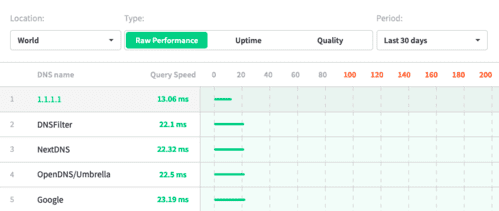
NextDNS is faster than Google over the last 30 days.
The privacy policy is also direct, concise and very clear:
- The data collected will never be sold or shared.
- Any data that should not be logged (by user choice) is immediately deleted.
- If the user does not explicitly request that their data be logged, nothing is logged. If the user requests it (to see their logs, as I was able to do), they have control over their data and the retention period.
- NextDNS protects you (it does not expose your IP address) when it queries other DNS resolvers.
NextDNS was also chosen as a Firefox partner to encrypt users' DNS queries (for now, the program is only available in the United States). This is a sign of seriousness (the only other partner is Cloudflare).
NextDNS vs. Pi-Hole?
If you want to stay in control and you like tinkering, Pi-Hole is a great solution. Note that you will still have to trust the DNS server called by Pi-Hole (upstream DNS), so you will always have to trust someone. NextDNS is a kind of "Pi-Hole in the cloud"; this article details the pros and cons of the two options.
If you want to explore the NextDNS option, I recommend this article as well as the NextDNS FAQ. For my part, the choice was quickly made: because it is simple to install and works on the move, NextDNS perfectly meets my needs. I can also easily install it for relatives who are not geeks.
Whatever your preferences, I encourage you to pay for quality information and protect your loved ones by installing tracker and ad blockers on their devices.