As mentioned in my article on Google services that collect your personal data, Google offers many services that capture personal data. The general public knows about its B2C services, but often does not realize that Google's advertising and analytics services also track them on third-party sites.
Originally, the acquisition of the DoubleClick advertising tool
This generalized tracking on the web and in applications started with the acquisition of DoubleClick in 2008, but until 2016, Google undertook not to associate your DoubleClick browsing data with your personal data without your opt-in consent.
- Here is what Google proclaimed until October 2016: “we will not combine DoubleClick cookie information with personally identifiable information unless we have your opt-in consent”
- Here is the new Google policy after October 2016: "Depending on your account settings, your activity on other sites and apps may be associated with your personal information in order to improve Google’s services and the ads delivered by Google."
Thanks to the Framasoft team, the remarkable study "Google data collection" was translated into French. This study explains how Google associates your DoubleClick data with your Google personal data: if you already have a DoubleClick cookie, then when you log in to your Google account, you send your Google authentication token and your cookie to DoubleClick in the same request, allowing your data to be cross-referenced.
Can you turn off this association?
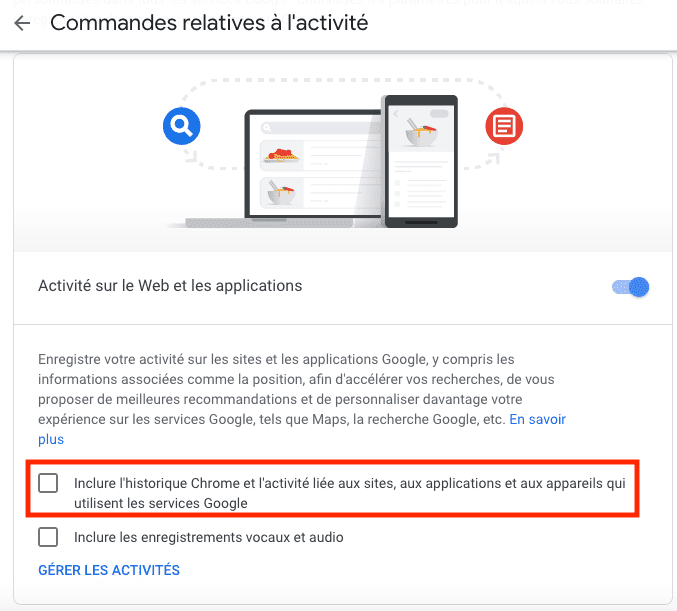
Now let's see whether you can turn off this association via your Google account settings. Seemingly yes: in Google Account > Data and personalization > Activity controls, you must uncheck “Include Chrome history and activity related to sites, applications and devices that use Google services”.
Then follow these steps:
- Disable your ad blocker
- Delete cookies in Chrome (Settings > Advanced settings > Clear browsing data)
- Then browse lemonde.fr, a site that uses DoubleClick services (Google Ad Manager, Google's publisher ad server and SSP)
- Open the Chrome console (⌘+Option+J on Mac, Ctrl, Shift and J on PC), go to the "Network" tab and filter on doubleclick
- Scroll down the page (lemonde.fr treats scrolling as cookie acceptance, which then triggers advertising tracking)
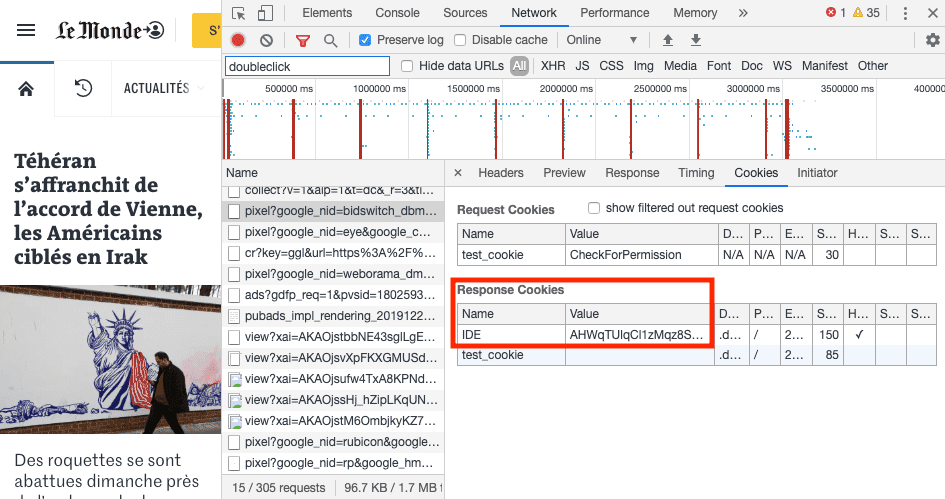
- In the console's "Network" tab, check your DoubleClick cookie
Via lemonde.fr, DoubleClick now follows you on the web with the “IDE” cookie:
You will now log in to your Google account:
- Go to google.com and open the Chrome console
- Log in and filter the Chrome console on doubleclick
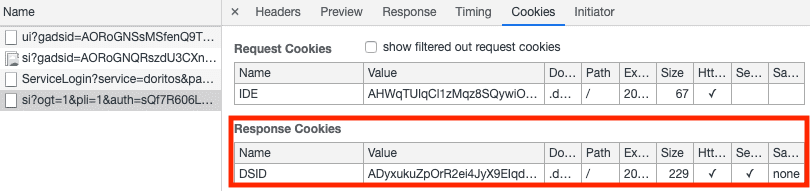
Google sends your authentication token to DoubleClick as well as your DoubleClick "IDE" cookie, allowing your pseudonymized DoubleClick data to be associated with your Google personal data. But unlike in the "Google Data Collection" report, you have unchecked the inclusion of activity related to sites that use Google services. Why does Google still make this association?!
DoubleClick saves this association in a new cookie, “DSID”:
Let's see what Google says about this cookie in its privacy policy: "We also use cookies called “AID”, “DSID” and “TAID” to track your cross-device activity when you are already signed into your Google account from another device. We do this to coordinate the ads you see across devices and measure conversion events.".
In fact, Google is more talkative in the online help for its B2B tools:
- Google Analytics: "When users enable ad personalization, Google can get an overview of their interaction with an online property across different browsers and devices. For example, this allows you to analyze how users browse products on your site on their phone, then return later to make a purchase via their tablet or laptop. With the large volume of data generated by users who have enabled ad personalization, Google can produce estimates about the cross-device behavior of your entire user base."
- DoubleClick Campaign Manager (its advertiser ad server): "Cross-environment conversion reporting combines cookies (for web), resettable device IDs (for mobile apps), and anonymous Google logins to identify a user across environments."
If you want to object to this “multi-device” tracking, it’s complicated. You can therefore disable ad personalization: "These cookies may come from the websites google.com/ads, google.com/ads/measurement, or googleadservices.com. If you do not want the ads you see to be coordinated between your devices, you can opt out of Ad Personalization in Ads Settings".
This will make you disappear from Google Analytics reports, but apparently not from DoubleClick Campaign Manager reports.
Conclusions
This test casts doubt on how much Google respects your choices regarding your personal data:
- You can uncheck “Include Chrome history and activity related to sites, applications and devices that use Google services”, but Google will still send your authentication token to DoubleClick, allowing your pseudonymized data to be associated with your personal data. How can you check that Google does not in fact associate your data? Short of an internal audit, this is impossible today.
- DoubleClick tracks you across all your devices when you are logged into your Google account, thanks to the "DSID" cookie; your Google account settings can't do anything about it.
- If you want to stay logged into your Google account, the most direct option to stop this tracking is to install an ad blocker.